


Disneyland®
4.523.93K Reviews
App Specs
- Version
- 8.24
- Updated On
- License
- Free
- Downloads
- 5,000,000+
- Developer
- Disney
- Categories
- Travel & Local
- Platform
- Android, iOS
Screenshots
 Analysis by AppCompare
Planning a Disneyland day involves more than choosing rides: you may be coordinating tickets, meals, directions, and different energy levels in one busy place. I find the Disneyland® app most useful as a practical companion for those decisions, rather than a replacement for asking staff or making a flexible plan. It brings several park tasks together, which can reduce backtracking when a group is trying to agree on what to do next.
Who benefits most from having the app
I’d recommend it to first-time visitors who want park information in one place, and to returning guests who already know what they enjoy but would rather check details on a phone than walk across the park to find out. Families can use it to keep tickets together and coordinate food stops; solo visitors may find the map and wait-time information useful for adjusting plans without having to negotiate every change with a group.
It is less essential if you are visiting only briefly, prefer to keep your phone away, or already have a simple plan and are comfortable navigating without digital help. It also should not be treated as a guarantee that a particular attraction, meal option, or schedule will fit your day exactly. I use it to make informed choices, while leaving room for changes and the occasional spontaneous detour.
Your Personal Guide to Magic
Upon launching the app, you’re greeted with a vibrant and colorful interface that instantly transports you to the world of Disney. It’s like Mickey himself is guiding you! The app's functionality is seamless and intuitive, making navigation a breeze even for those who aren't tech-savvy.
Readability and finding your way
That welcoming look makes the app feel approachable, but a colorful screen is not automatically the easiest screen to use in every situation. When I’m checking a map while walking, I need to pause, orient myself, and look carefully rather than assume a quick glance will answer everything. The useful habit is to decide on the next destination before setting off, then use the map for confirmation instead of trying to read it while moving through a crowd.
The interactive map and the rest of the planning tools work best as a set: check where you are, compare the next stop with the wait information, and decide whether the walk is worth it. That small sequence is more helpful than treating each feature as a separate novelty. It can also prevent a common planning mistake: crossing the park for one attraction and then discovering that the next thing on your list is back near where you started.
Real-Time Updates
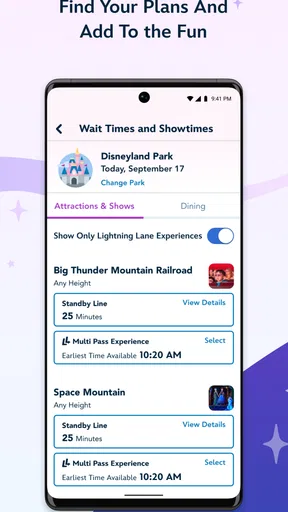
One of the standout features of the Disneyland® app is its real-time updates. From current wait times for rides to show schedules, everything is right at your fingertips. This feature is a game-changer, especially if you want to maximize your time and hit all the must-see attractions. No more wandering around aimlessly! Just check the app, and you’re good to go.
Worth Reading Before You Choose

EA SPORTS FC Mobile 26 Is a Bigger Football Game, but It Takes Time

Flipboard Shows What News Apps Must Do Beyond the Feed

Switching to Android Auto Means Rethinking Your Driving Routine

Google Calendar Makes a Crowded Week Easier to Manage

Ludo King Makes the Most of the Minutes Between Plans

Baby Panda World Brings Quick Play to Modern Phones, but Its Game Library Feels Busy
I’d still treat wait information as a planning signal, not a promise that the line will remain unchanged by the time you arrive. A practical approach is to compare a couple of nearby choices and pick the one that works for your group right now. If someone needs a quiet break, for example, a shorter wait elsewhere may matter less than choosing a route that avoids rushing from one end of the park to the other.
Interactive Map
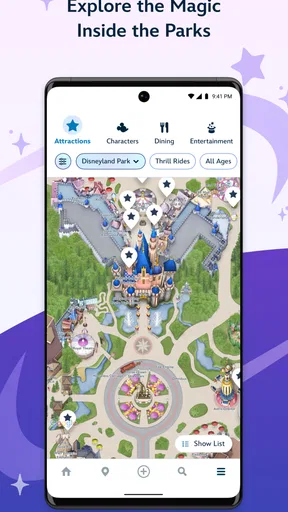
The interactive map is another highlight. It’s detailed and user-friendly, showing you exactly where you are in the park. Whether you’re searching for the nearest restroom or your next dining adventure, the map has you covered. It’s like having a magic wand that points you in the right direction every time.
For a realistic family visit, I’d use the map before leaving a meal or attraction to agree on the next landmark, especially if the group is splitting up briefly or moving at different speeds. It is also handy when plans change: instead of following a rigid route, you can look for a suitable nearby stop and regroup there. The trade-off is that map reading still takes attention. If you find small on-screen details hard to distinguish, take a moment in a safe spot and ask a companion or a cast member for help rather than trying to navigate while distracted.
Motor and sensory considerations
For visitors who find prolonged walking, standing, or fast-paced decision-making difficult, the app can help reduce avoidable movement by letting them check directions, meal choices, and park information before setting off. That does not remove the physical demands of a theme park, and it does not make every route or queue manageable. I would use the app to plan fewer, more deliberate transitions rather than trying to squeeze in every possible stop.
There is a similar distinction for sensory needs. A phone can make it easier to pause and review options away from a busy decision point, but the app itself is still a screen with visual information and notifications. If bright, crowded surroundings or repeated alerts make concentration harder, it may help to check the essentials at a calmer moment and avoid relying on constant prompts. I would not assume that the app offers a particular sensory setting or accessibility service just because it is useful for planning.
Dining Reservations and Mobile Ordering
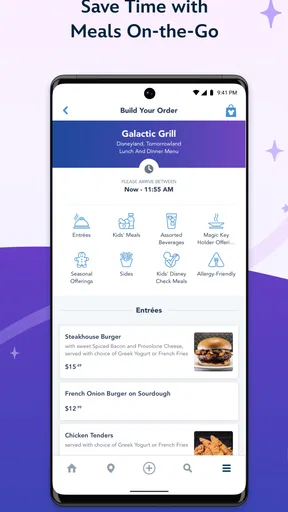
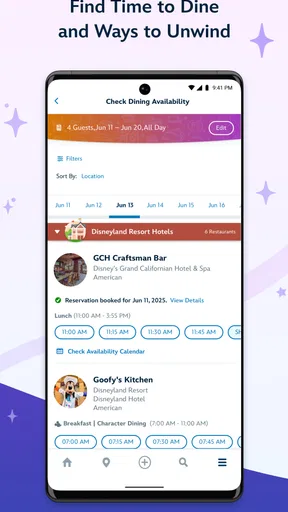
If you’re anything like me, food is a big part of the Disneyland experience. With the app, you can easily make dining reservations and even order food in advance from select locations. This means less time standing in line and more time enjoying those churros and Dole Whips. Yum!
Mobile ordering is especially useful when a group is ready to eat but does not want to spend its break debating where to go. I’d agree on a location and meal plan first, then use the app to handle the order where that option is available. The limitation is in the wording: ordering ahead applies to select locations, so it should not be assumed to cover every place to eat. A reservation and a mobile order also serve different purposes, so I would check which one suits the meal rather than expect one action to cover both.
Disney Genie Service
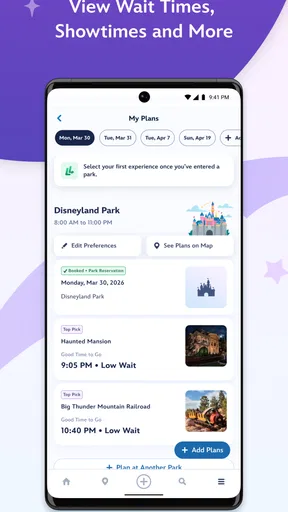
Now, let’s talk about the Disney Genie service. This nifty feature offers personalized itineraries based on your preferences, making it easier to plan your day. It’s like having a Disney expert in your pocket, guiding you through your magical journey. I found it incredibly helpful for discovering attractions I might have otherwise missed.
I see an itinerary as a starting point, not a schedule I need to obey. It can surface ideas when I’m unsure what to do next, but my group’s pace, rest needs, and meal timing still matter more than completing a suggested sequence. One useful way to apply it is to choose a few priorities, then let recommendations fill gaps rather than letting a full-day plan crowd out breaks or spontaneous choices.
Tickets and Passes
Gone are the days of fumbling with paper tickets. With the app, all your tickets and passes are stored digitally. Just scan your phone at the entrance, and you’re in! This feature is especially handy for families or groups, as you can manage multiple tickets within the app. Plus, if you're planning to visit frequently, the app makes it easy to explore annual pass options.
For a group, it is worth sorting out whose phone will hold or manage the relevant tickets before reaching the entrance. That simple bit of preparation can prevent a last-minute scramble while everyone is waiting to scan in. I’d also keep the group together while checking the ticket screen and make sure the phone is ready before approaching the entry point. Digital convenience depends on having access to the device at the moment you need it, so it is sensible to think through who will handle that task.
PhotoPass Integration
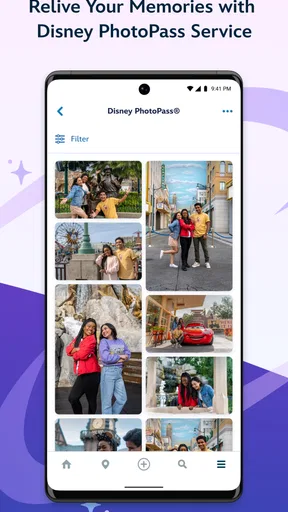
Another magical feature is the integration with Disney’s PhotoPass. You can view, download, and share all your park photos directly from the app. It’s perfect for capturing and reliving every magical moment of your trip. And let’s be honest, who doesn’t want a photo with Mickey?
This is most useful when you want to keep trip photos connected to the visit rather than search through several places afterward. I’d check the app when the group has a quiet moment instead of interrupting a ride or meal to review every image. It is a nice extra, but visitors who do not care about collecting or sharing park pictures can simply focus on the navigation and planning tools.
Situational access and everyday use
As a travel and local app from Disney, it is built around the Disneyland visit rather than being a general-purpose map or city guide. That focus is its advantage inside the park: tickets, park information, and relevant planning features sit close together. A standard maps app can be a better choice for broader directions beyond the Disneyland experience, while a paper plan or a conversation with staff may be preferable for someone who does not want to manage a phone during the day.
Imagine arriving with relatives who have different priorities: one wants to check an attraction, another is hungry, and someone else needs time to rest. I’d use the map to find a sensible nearby next stop, check the current wait information, and look at food options before the group walks off in different directions. That workflow helps the group make one decision at a time. It is more realistic than expecting an app to remove queues, crowds, or the need to compromise.
Accessibility Features
Disneyland® is for everyone, and the app reflects this beautifully. With features that cater to various accessibility needs, everyone can enjoy the magic without any hassle. From visual aids to translation services, the app ensures no one misses out on the fun.
I would be cautious about reading that broad promise as a substitute for checking whether a specific need is covered. The app can support planning, but a visitor should not assume that every accessibility requirement can be handled through it. If a particular service or accommodation is essential to the visit, I’d confirm the relevant arrangements directly with Disneyland before relying on the app alone. That is a more dependable approach than arriving with an expectation based only on a general feature description.
Remaining barriers and practical trade-offs
The biggest limitation is that concentrating park tasks on a phone can create its own friction. A visitor may need to stop, unlock the device, find the right part of the app, and read the screen while other people are moving around. Phone access, battery planning, and comfort with on-screen navigation all affect how convenient a digital ticket or map feels in practice. I’d prepare the key details before a busy moment and avoid making the phone the only way the group can remember its plan.
There is also a difference between having information and being able to act on it. A current wait estimate can guide a choice, but it cannot make a queue suitable for every person. A map can show where to go, but it cannot judge whether the route feels comfortable to someone in the group. In my view, the app is strongest when it helps people ask better questions and make a plan together, not when it is treated as an automatic solution for access needs.
In-App Notifications
Don’t worry about missing out on special events or limited-time offers. The app sends timely notifications to keep you informed about everything happening in the park. Whether it’s a parade or a fireworks show, you’ll always be in the loop.
Notifications can be useful when you want reminders about what is happening, but constant phone prompts are not right for everyone. I’d decide whether alerts suit the way I want to spend the day and check the app deliberately when useful, rather than let every notification interrupt conversation or downtime. That balance matters particularly for visitors who are trying to reduce screen distraction or keep the group focused on the surroundings.
Who should choose another approach
If your priority is a broad regional trip rather than a Disneyland visit, a general map or travel-planning tool is likely to be more useful for most of the journey. If you prefer to avoid screens, you can still plan around a few chosen activities and ask staff for help when needed. And if accessibility depends on a particular arrangement, direct confirmation is more important than assuming that the app’s planning features cover it.
For visitors who are comfortable using a phone and want park-specific tools together, this is a more convenient choice than juggling separate notes for tickets, food, and directions. The app’s value is not that it makes the day effortless; it is that it can reduce some of the small decisions that otherwise consume time. Whether that trade-off is worthwhile depends on how much you want your phone involved in the visit.
A useful companion, not a substitute for flexibility
Disneyland® is a free app from Disney, rated for Everyone, and it has an average rating of 4.5 from around 91,000 ratings, with over five million installs. Its current version is 8.21, and it has been available since August 4, 2015. Those figures suggest that it is a well-established choice for visitors, but they do not change the practical question: do you want a phone-based guide while you are in the park?
My answer is yes for a planned visit, especially when tickets, food, and navigation all need attention, but with sensible expectations. I’d use it to reduce unnecessary wandering and keep a group coordinated, while leaving the final call to the people on the day. Visitors who need a very specific access arrangement should verify it directly, and those who dislike screen-based planning may be happier with a simpler approach.
In conclusion, the Disneyland® app is like having a magical toolbox that makes your park experience smoother and more enjoyable. With its array of features and user-friendly design, it’s a must-download for anyone planning a trip to the happiest place on Earth. So, get ready to explore, eat, and capture all the magic Disneyland has to offer—all from the convenience of your smartphone. Happy adventures!
Pros
- Immersive park maps for easy navigation.
- Real-time ride wait times and updates.
- Customizable itineraries for planning.
- Dining reservations directly in the app.
- Integration with Disney Genie for tips.
Cons
- Requires constant internet connection.
- Battery drain due to GPS usage.
- Complex interface for first-time users.
- Limited features without in-app purchases.
- Push notifications can be overwhelming.
FAQs for Disneyland®
What is the main purpose of the Disneyland® app?
The Disneyland® app is designed to enhance your park experience by providing real-time information on wait times, show schedules, and dining options. It also allows you to purchase tickets, make reservations, and navigate the park with interactive maps. The app is a comprehensive tool for planning and enjoying your visit to Disneyland.
Can I use the Disneyland® app to purchase tickets and make reservations?
Yes, the Disneyland® app allows you to purchase tickets directly from your mobile device. You can also make dining reservations and secure access to popular attractions with Disney Genie+ and Lightning Lane selections. This feature streamlines the planning process, ensuring you spend more time enjoying the park and less time waiting in lines.
How does the Disneyland® app help with navigation inside the park?
The app features an interactive map that helps you navigate the park effortlessly. It provides detailed directions to attractions, dining locations, and restrooms. The map also updates in real time, showing current wait times and helping you locate characters, shows, and events, making it easier to plan your day efficiently.
Is the Disneyland® app suitable for all ages?
While the app is designed for users of all ages, younger children might need assistance from an adult to navigate its features. The app includes family-friendly features such as character meet-and-greet locations and showtimes, making it a valuable tool for families visiting the park together. Parental guidance is recommended for purchases and reservations.
Does the Disneyland® app require an internet connection to function?
Yes, the Disneyland® app requires an internet connection for most of its features, such as real-time updates on wait times and the ability to make reservations. It's advisable to have a data plan or access to Wi-Fi while using the app in the park to ensure you can take full advantage of its capabilities.


